Aligned with broad EYLF outcomes
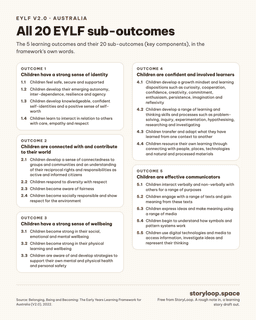
StoryLoop links to the five EYLF learning outcomes only when the observation supports them, with attention to identity, community, wellbeing, confident learning, and communication.
Australia EYLF
StoryLoop supports Australian educators with plain-language learning story drafts connected to EYLF V2.0 outcomes, without turning the story into policy-speak.
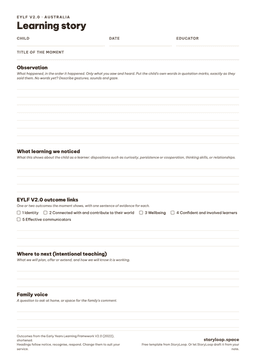
Start with what actually happened: one action, quote, attempt, change, or question. A polished observation is never required.
StoryLoop drafts and checks. The educator reviews, edits, decides what is true, and chooses whether anything is shared.
What StoryLoop does with a note
A real note an educator typed, and the start of the draft StoryLoop wrote from it, unedited, with the EYLF V2.0 links, learning and next steps to follow.
Jack sorted the bear counters by colour into the cups. Then lined up the red ones and counted 8. Put 2 blue ones on the end and said 'now it's ten'.
Sorting and making ten
Jack sorted the bear counters by colour into the cups. After sorting, he lined up the red bears and counted them. Jack counted 8 red bears, then added 2 blue bears to the end of the line and said, “now it's ten”.
What learning we noticed
Jack used sorting, counting and adding in one clear sequence. He noticed the colours, organised the bears into groups, counted the red bears, and then changed the set by adding two more. When Jack said, “now it's ten”, he showed that he was thinking about the total, not just naming the colours or counting by rote.
Type what you saw today. StoryLoop writes the draft here, with EYLF V2.0 links, and shows you exactly what it is built on. Use first names only: demo notes are not saved to any account and are never used to train AI.
No signup for your first try. Use a first name or initial only.
Your draft appears here, with EYLF V2.0 links that only claim what your note shows, usually in under a minute.
Tip: what the child did, one thing they said, and what happened next. Three lines is plenty.
Want to keep it? Start free: 3 stories a month, no card. You check every word before anything is shared.
StoryLoop links to the five EYLF learning outcomes only when the observation supports them, with attention to identity, community, wellbeing, confident learning, and communication.
New educators get help with structure and wording. Experienced educators get a faster first draft they can refine with their own professional judgement.
Record or type the real moment, then review an editable draft with outcomes, learning dispositions, and practical responding ideas.
FAQ
Yes. Australian mode uses EYLF V2.0 learning outcomes and keeps the link grounded in what the educator observed.
Yes. It is not a replacement for professional judgement; it is a drafting tool to reduce backlog and support reflective wording.
No. StoryLoop supports drafting and structure, while educators remain responsible for observation, interpretation, reflection, final editing, and sign-off.
Yes. Stories are editable after generation and saved in history, so educators can add context, adjust wording, copy, export, or regenerate from the original observation.
StoryLoop is designed to avoid generic, poetic AI wording. It asks for real observations, keeps claims evidence-based, and links curriculum only when the observation supports it.
The free plan includes 3 learning stories per month. Upgrade prompts are dismissible, and existing history remains available even if the free limit is reached.